Key takeaways
- Install Auditor from Linear's integrations directory, or from Add-ons › Issue trackers on your Auditor page; a Linear admin approves it once, and it connects as the workspace's app, not as a person.
- Reviews read the Linear issue a pull request names and list what the issue asks for that the change doesn't do, on the pull request and, if you turn it on, as one comment on the issue.
- Mention @Auditor on an issue to ask whether its pull request is ready to merge or what review flagged, or assign it the issue to get a plan or a pull request that fixes it.
- Anyone in the workspace gets answers and plans; you choose who can also have it change code, and set a limit per reply and per month. Model calls are billed to your Auditor key like reviews.
Auditor's Linear app is listed in Linear's integrations directory as of today. It has been part of Auditor since November 4, and the roundup of that week's launches gave it a section. This is the fuller introduction: what the app does on a Linear issue, how it gets there, and what stays under your control.
Auditor reviews GitHub pull requests. The Linear app connects that review to the issue the pull request is for, and lets the issue talk back: ask Auditor about the work, or hand it the work.
Installing it
From the directory, Add to Linear opens app.inferencebureau.com/auditor/linear. It signs you in, asks which Inference Bureau team if you admin more than one, and opens that team's Linear tracker under Add-ons › Issue trackers. Enter your workspace's address (linear.app/your-workspace) and choose Sign in. Linear asks an admin of the workspace to approve the Auditor app. From then on the app is connected as the workspace's app, not as whoever clicked, and Auditor refreshes the sign-in on its own.
You can start from the Auditor page instead and end up in the same place. Only owners and admins of your Inference Bureau team can connect a tracker.
One more step makes the connection useful: on each repository's Tickets tab, give it the ticket keys that point at it. With key ENG, a pull request whose branch, title or commit message says ENG-412 is linked to that Linear issue.
Use a token is the other way to connect, with a personal API key. Reviews can read issues through it, but the app can't be mentioned or assigned issues through a token, so the rest of this article needs Sign in.
The review reads the issue
With a ticket key set and Check changes against their ticket on, a review reads the issue's title and text before it reads the diff. Then it lists up to three things the issue asks for that the change doesn't do, or says that the change may not be the issue's work at all. The finding is part of the review on the pull request, the same as any other.
Turn on Say it on the Linear issue too, on the Linear tracker's page, and the same finding is posted on the Linear issue, where the person who wrote the ticket will see it. There is one comment per pull request, edited on later reviews rather than added to. A pull request whose check finds nothing gets no comment. One whose earlier comment listed gaps has it changed to say nothing is missing any more, so the comment never goes stale. It links the pull request, and says it was compared from the issue's text, not the code, since a missing part may be planned for another pull request. It never fails the check.
Ask @Auditor on the issue
Mention @Auditor in a comment on an issue. Linear opens an agent session on the issue, and Auditor shows it's working within a few seconds. The questions people ask first are about the pull request: is it ready to merge, what did review flag, what does this change touch. Auditor reads the pull request at its head commit, the review and its open findings, and the issue, and answers from the code. A question never changes code.
It works in the repository the issue is about. That is the repository of a pull request linked to the issue, else the GitHub issue the Linear issue is synced from, else a repository whose ticket key is the issue's prefix, else your team's only repository. When it can't tell, it says so in the session and asks you to link a pull request or set a ticket key.
Assign it the issue
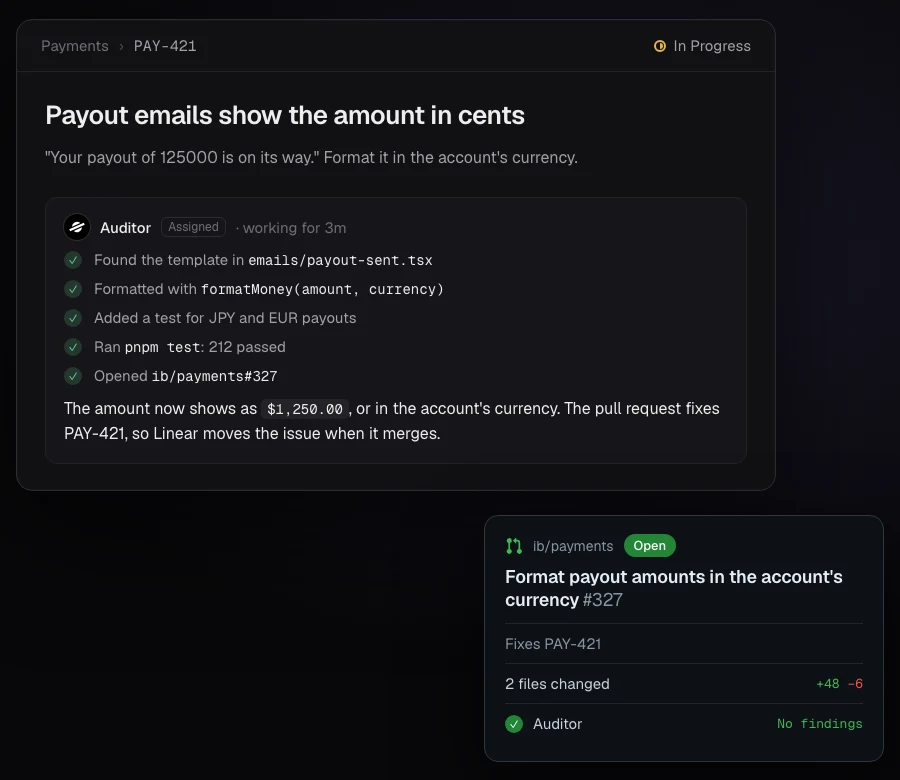
Assign the issue to Auditor, or mention it and ask for the change. It writes a plan, or makes the change, with tests where the repository has them, checks it in a sandbox with the repository's own tools, and opens a pull request whose description ends Fixes ENG-412, which Linear links back to the issue. With a pull request already linked, the change goes onto that pull request's branch. It can also open a GitHub issue when the work belongs there.
Each Linear issue is one conversation. A follow-up in the session continues it with the earlier work in place, and one sent while it's still working is read before its next step. Push back on the plan and say go ahead when it's right.
The work is done by your team's Issue assistant, the automation that also answers @auditor on GitHub issues, so its model and instructions are shared between the two. Edit instructions on the Linear page opens it. Every conversation is listed on the Linear page with what it read, changed and opened. A repository's Tickets tab can switch Auditor in Linear off for that repository, give it its own instructions, or set its own limit per reply.
Who can have it change code
Anyone in the Linear workspace can ask and get answers and plans. Who can have it change code, on the Linear page, decides who can also have it change code, open pull requests and open GitHub issues:
- Anyone in the workspace. Connecting Linear is the team's consent, and the spending limits below still apply.
- Allowed people: Linear users whose email belongs to a member of your Inference Bureau team, is at one of the email domains you list, or is one of the addresses you list.
- No one: everyone gets plans and answers only.
Someone who isn't allowed is told in the session that Auditor will plan and answer, and that a team admin can add them.
What it costs, and what it reads
There is no seat price and no fee for the app. Every model call is billed as inference to your team's Auditor key, like a review, under the same spend caps. On the Linear page you set the most one reply may spend and a monthly limit, and see this month's spend over its conversations. A reply that reaches its limit stops and says what it got done; replying again continues from there.
The app asks Linear for permission to read and write issues and comments, and to be mentioned and assigned issues. It reads the issue a pull request names, or the issue it's asked about: identifier, title, description, links, the request and who made it, and, with Allowed people, that person's email. It doesn't read other issues, projects or members of the workspace. The access token is stored encrypted, and the issue's text isn't used to train models. The privacy policy has the details. Disconnect on the Linear page deletes the token, and removing Auditor under Settings › Applications in Linear revokes it on Linear's side.
Frequently asked questions
Do I need Linear's GitHub integration as well?
Auditor finds the issue a pull request is for on its own, from the ticket key in the branch name, title or commit message. Linear's GitHub integration is what links a pull request back to the issue in Linear and moves the issue when it merges, so most teams have both.
Can Auditor work on an issue that has no pull request yet?
Yes. It works in the repository whose ticket key is the issue's prefix, or your team's only repository, and opens a new pull request that fixes the issue. When it can't tell which repository, it asks in the session.
What about Jira?
Jira connects as a tracker too, with a token, so reviews read Jira issues the same way. There is no Jira app to mention or assign issues to.